May staycation

Friday, May 17th 2013

From tomorrow (May 18th) until Monday week (May 27th), we are on holiday. We are not going away this time, at least not to stay. We will be holidaying from home, going on day trips.

I doubt whether I will have time to write even interim posts, though I will do so if possible. I will catch up on our adventures afterwards.

Copyright © 2013 SilverTiger, http://tigergrowl.wordpress.com, All rights reserved.

Posted in Travel | 2 Comments

A kind of vindication

Thursday, April 16th 2013

As I reported back in March (see Frustrated by snow), we had planned a short trip to Berlin in celebration of Tigger’s birthday but the trip was called off because of a heavy snowfall which caused our flight to be cancelled. Although British Airways offered us a replacement flight, this would have been in the evening, getting us to Berlin very late, and in any case, was not guaranteed to depart. We therefore exercised our right to cancel the trip. We were told by BA that we were entitled to a full refund of the air fare and that we could obtain this through their Web site. In the event, it turned out that this was incorrect, and that seeking our refund would not be at all straightforward…

The problem was that we had booked our tickets online, not with BA but with a company called Crystal Travel. We ought to have checked up on this company before ordering our tickets as I later found a lot of bad reviews and criticisms of them online. The cost of fares came to £349.50 and I paid by credit card. The invoice contained that price and no mention was made of a surcharge for the use of a credit card so I was irritated, if not unduly surprised, to find that the amount charged to my credit card was £358.241.

As soon as we got home from the airport, I telephoned Crystal Travel and asked to cancel our tickets in return for a refund. The line was bad (I suspect that the phone is put through to an office overseas) and a lot of repeating was necessary to make ourselves understood. Eventually, the person on the line confirmed that the flight had been cancelled and that “The office will phone you about cancellation charges”.

I waited a couple of weeks and during this time there was no telephone call and no refund appeared on my credit card account. I called Crystal Travel again. The line was as bad as before and it took a while to get my details understood but even then the answer was disappointing: “The office is currently closed but I will pass on your details and they will phone you.”

As this was essentially the same as the previous response, I realized it was pointless to hope that something would happen this time but I was determined to get our money back. What should I do?

The first thing I thought of was to phone the company which had issued my travel insurance. Many banks these days offer incentives to their customers and my bank gives me free travel insurance to cover all the usual things such as illness, accident, loss of baggage and… cancellation costs. I drew a blank here, however, as the clerk informed me that they would pay out only if I could produce a letter from the travel company telling me that they would not refund my fares. This was obviously a non-starter as they couldn’t be bothered to phone me, let alone write me a letter.

My next thought was that I had paid by credit card and that this might offer a solution. Credit card companies by law have some responsibility in cases where a purchase has gone wrong and they can be asked to refund the money. So I called my credit card company. They have been helpful in the past and I hoped that they would be so again. The clerk was welcoming and listened to my story. Yes, he said, he thought I could be refunded though their claims department would have to look into the matter. In the meantime they would block payment. Too late, I said: that bill was paid back in February.

The credit card company sent me a claim form to fill in. It is fairly short (two sides of A4) with little room for information. I realized now, if I had not realized before, that I was hampered by a lack of documentary support for my claim. All I had was the printouts from the original purchase, the transaction as it appeared on my credit card account and my own verbal statement of the facts. Of course, such matters as the cancellation of the flight could be checked.

I felt that the form did not do justice to the case, so I sat down and wrote, in my best prose, a Narrative of the Claim. I told the story, punch by punch, referring to such documents as there were, attached it to the form and sent it off. I hoped that this would do the trick.

A week later, having heard nothing, I rang the credit card company again. Polite and friendly as ever, they told me that my claim had been received and that their policy was to respond within 3 to 5 working days. Another week passed during which I checked my account online but no refund appeared.

Then, on May 1st I received a letter. The important paragraph read as follows:

We’ve credited your account with the amount(s) involved, while we make further enquiries. This will show as a credit on your statement. If you receive a refund from the retailer or the retailer provides further information which confirms that the transaction is valid, we may remove our credit(s) at a later date.

This is in line with the text I received when I made a similar claim some years ago, so I think it extremely unlikely that I will hear any more about the matter.

In material terms, I am of course satisfied to the extent that our money has been refunded and we are not out of pocket. Morally, however, a question remains: it should be the travel company, not the credit card company, that repays the money. I can only hope that my credit card company will take steps to obtain reimbursement from Crystal Travel and also give them a severe ticking off for shabby business practices.

The refunded money will be “recycled” next month when we take a trip to replace the one we lost back in March. There will be more news of that in due course. Oh, and we booked our tickets with BA direct this time…

________

1Charges for the use of credit card for online purchases have risen to scandalous levels, far in excess of whatever fees banks charge to vendors. It is blatant profiteering. The government has now issued guideline but many companies are ignoring them or pretending to be unaware of the existence of guidelines.

Copyright © 2013 SilverTiger, http://tigergrowl.wordpress.com, All rights reserved.

Posted in Travel | Tagged , | 2 Comments

The Barbican and its conservatory

Sunday, May 12th 2013

This morning was largely taken up with a leisurely breakfast (guess where?1) and the usual shopping trip to Sainsbury’s. After more leisureliness (which included putting away the shopping, drinking tea and desultory plinking on our respective computer keyboards), we decided to go out again.

Tigger had a plan.

“It’s not something you’ll like much,” she added, by way of encouragement.

This is what it was:

Michael Caine
Michael Caine
An exhibition at the Museum of London

The Museum of London is currently holding an exhibition on the life and career of actor Michael Caine and Tigger wanted to see it. I was happy to go along too as it made an outing and admission was free (my favourite price). Photography was not allowed so we had to be content with a couple snapped from outside.

Tigger was right, though: left to my own devices, I wouldn’t have bothered. Not that I have anything against Michael Caine – I haven’t. The few films of his that I have seen, if they didn’t bowl me over, were not too bad either. The man has character – or, charisma, to use the favoured word – which is more than you can say for some of the luvvies disporting themselves on the screen these days. No, I’m fine with him as an actor, it’s just that I have not the least interest in him as a person or in the story of his life from cockney sparrer to film legend.

As an exhibition, it’s pretty boring. It consists mainly of photos of Caine at various moments in his life and on the screen, some clips from his films (e.g. the “You were only supposed to blow the bloody doors off” scene) and footage from various interviews such as those by Parkinson, in which our boy gets to do an imitation of himself. All good clean fun but I would have thought they could have managed a few artifacts such as costumes and props.

Stairway to Heaven?
Stairway to Heaven?
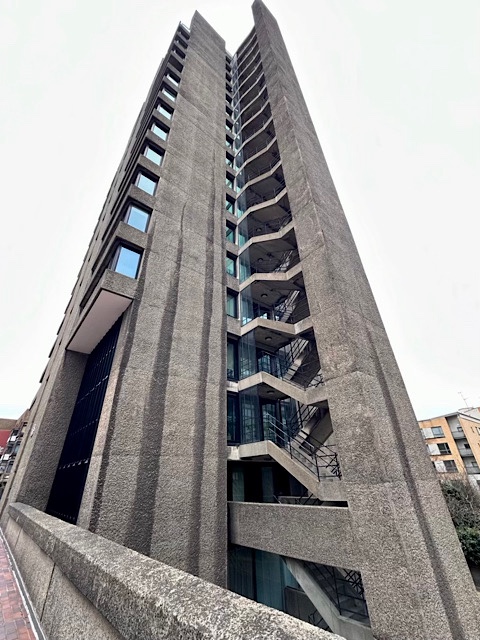
External stairs, residential block, Barbican Estate

More interestingly, we went to the Museum of London via the Barbican. The Barbican is a huge complex, consisting of two parts. Firstly, there is a huge residential estate, built to replace housing destroyed by bombing in the Second World War, and originally intended as Council flats, but now privately owned. Secondly, there is the arts complex dedicated to “art, music, theatre, dance, film and creative learning events”. Altogether, the place is vast and it’s not always easy to find your way around.

Angles and mixed perspectives
Unlovely and unsubtle

The buildings of the Barbican cannot be described as beautiful. They are in the Brutalist genrel, huge blocks of concrete rough cast and unfinished. As I walk about there, I feel myself worrying that I might stumble against a wall and shred my skin on it.

Tall tower
Tall tower
Dominating the skyline

Immensely tall towers dominate the skyline and on all sides great concrete blocks of masonry close in the view. I say “masonry” rather than “architecture”, though I suppose someone must actually have designed these monstrous structures. The ground between the buildings is like a wasteland and much of it seems to be dug up or closed off with barriers. Despite the occasional bench, I never see anyone here.

Dolphin fountain
Dolphin fountain
A patch of greenery

In one place, there is a patch of greenery with a fountain decorated with two bronze dolphins. The fountain flows and is kept clean but, again, I never see people here.

Today, however, inside the arts complex we visited what may be just about the pleasantest place in the Barbican. The public can access this facility but it is open only at certain times.

The Barbican Conservatory
Not always open but worth a visit when it is

I was quite surprised to learn that there was a conservatory in the Barbican and interested in visiting it. It is big, like everything else here, and has two levels. The air is humid, as you would expect, but as long as you can bear that, the visit is enjoyable.

Exotic plants
Exotic plants
A tidy jungle

The conservatory is of course packed with plants, flowers and trees of many kinds, mostly exotic, I think, though I am no expert. Despite the abundance, the place is clean and well kept, a sort of tidy jungle.

One of the ponds
One of the ponds
With plants and fish

As well as solid earth, there are ponds and running water, these bodies of water also furnished with aquatic plants and with fish. The water is clean and clear and the fish can be seen swimming about.

Large fish
Large fish
Swimming about in shoals

In some places there are groups – almost shoals – of large fish, possibly Koi Carp. They make an impressive sight.

Turtle
Turtle
Meditating on a rock

We climbed the stairs to the upper level and on the way spied a turtle in a small pool, sitting on a rock. He was very still as though meditating.

Cactus garden
Cactus garden
Just one corner of it

On the upper level there was an extensive garden of cacti and succulents and the picture above shows just one corner of this. There was much more and many other types of plant.

Hanging basket
Hanging basket
Beautiful colourful flowers

While I enjoyed the plants and trees and the pleasant atmosphere of the walkways, there was something else in the conservatory that was my favourite feature. Now, I must say that I disapprove of keeping any animals in cages, especially birds whose very raison d’être is to fly free in unlimited space. With that reservation in mind, my favourite feature was the small aviary on the ground floor.

The whistler
The whistler
Not impressed with my attempts to imitate him

We spent some time watching the birds and they flew about within their cage. On the plus side, the aviary was clean and the birds looked healthy, except for one of three young quail, one of which had bald spots on his back – possibly as a result of bullying by the others. The “whistler” as I called the bird pictured above, spent his time emitting low, single-note whistles. I was able (it seemed to me) to make a sound close to his but I could see he wasn’t impressed by my efforts!

Colourful bird
Colourful bird
Is it a finch?

As you can imagine, photographing birds in the aviary is quite difficult. For one thing, these small species flit about rapidly and often take off just as you click the shutter, leaving you with a picture of an empty branch! For another, the enclosing wire mesh gets in the way. This doesn’t cause problems with watching the birds because the brain simply tunes the wire out but the camera is not so clever. This is where manual focus is a necessity – it allows you to get past the wire, as it were.

Barbican terrace
Barbican terrace
Sit outside or visit the cafe

After our visit to the conservatory, we went down to the broad public terrace that has seats and a view over one of the ornamental lakes. There is a cafe here where we had some soup.

St Giles Cripplegate
An old church in the heart of the Barbican complex

From the terrace there is a good view of the old church of St Giles Cripplegate. Its name comes from the fact that it originally stood outside the wall of the city by one of the gates. It is thought that the first church was Saxon but it has been altered and rebuilt on several occasions, with a major rebuilding in 1545. Badly damaged in the bombing that laid waste to the area during the Second World War, the church was restored according to the 1545 plans.

Residents' garden
Residents’ garden
Barbican Estate

I have been critical of the architectural style of the Barbican but have to say that I have no idea what the dwellings are like or what it is like to live in the Barbican complex. Entrances to the estate are all locked and therefore accessible to the inhabitants alone. The same is true of the garden in the above photo. There is growing concern about the way “gated communities” are proliferating but in these days of crime and violence I imagine the feeling of security is reassuring to residents.

Another tower
Another residential tower
I hope the lifts are in working order…

________

1If you guessed Pret A Manger in St John Street, you guessed correctly :)

Copyright © 2013 SilverTiger, http://tigergrowl.wordpress.com, All rights reserved.

Posted in Out and About | Tagged , | 4 Comments

A shop, two galleries and a church

Saturday, May 11th 2013

Our first port of call this morning was Kentish Town. I used to work in the area and have retained a certain affection for it but I also think that it is one of those places that is often overlooked, perhaps because it languishes in the shadow of the more “happening” Camden Town. Kentish Town’s treasures don’t jump out at you – you have to seek them out.

Cafe Renoir
Cafe Renoir
Does it leave a good impression?

For breakfast we went to Cafe Renoir. Named after the Impressionist painter and using a large facsimile of his signature as its name sign, this cafe is familiar to us from previous visits. However, we found it was under new management with a few changes of furniture and decor. The somewhat amateurish Renoir pastiche decorating the walls of the back room was still there but it didn’t put us off our food too badly and will not prevent us returning. Oh yes, and the breakfast was fine, too.

Blustons
Blustons
A three-generation family firm

A few minutes’ walk from Renoir stands one of the afore mentioned treasures of Kentish Town. It is a shop selling clothing for ladies. I have been aware of Blustons as long as I have known Kentish Town and have admired the style of the shop and its will to survive while remaining true to itself. The business was started in 1931 by Jane and Samuel Bluston, Jewish émigrés from Russia. They had already started trading in the East End, going on to open a number of draper’s shops and, finally, this fashion store. Their other businesses closed in the 1950s and 1960s but Blustons remains in the family, being run today by Michael Albert, a grandson of the founders.

Shop arcade
Shop arcade
A rare survival

The shop front, including the Vitrolite lettering, is original and, I think, could stand unashamed beside the best modern shop designs. More remarkable still, however, is the arcade-style entrance with its glass-fronted display cases. This design was once common but has gone out of favour, modern shopkeepers usually preferring to use the space expand their floor area  instead, and survivals, especially on this scale, are becoming rare.

The Founders
The founders
Their portraits in the fitting room

The shop has two fitting rooms and in the larger we find photographic portraits of the founders, amiably looking out at the shop and its customers. Between them is a clock whose sunburst design reflects – whether by chance or intention, I do not know – the sunburst pattern of the stained glass in the shop front.

Second fitting room
Second fitting room
Note the neo-Classical wall mouldings

At the other end of the shop is a second, much smaller, fitting room. On top of it are family photos – a nice touch in a family business! On the wall we can see the original neo-Classical mouldings forming a panel design. This picture also shows that, sadly, the original interior of the shop has been stripped away and replaced by fittings of rather flimsy plywood. This was no doubt owing to the need felt to maximize floor space for the display of stock.

Cash desk
Cash desk
A certain informality in the layout

Another survival is the separate cash desk where customers would have gone to pay or where the assistant would have taken their money to give to the cashier. In this age of electronic tills, such cash desks have all but disappeared, or where they are still present, are often used for some other purpose, such as storage. As we can see, in some parts of the shop there is a certain informality in the way things are arranged!

Accessible and well presented
Protected by covers

Generally, though, the goods are accessible and well presented, with plastic covers to keep garments clean and dust free. This is obviously a working shop and not a museum. In the above photo, note the sunburst pattern in the stained glass as mentioned earlier.

Bedford Square
Bedford Square
Fine Georgian houses and a central park

Tigger made a purchase at Blustons, so we went home to drop it off and then took a bus towards our next destination. The bus left us at Bedford Square which is one of London’s fine squares of Georgian houses, built between 1775 and 1780. The central garden is now open to the public, a welcome oasis of greenery and mature tall trees.

Classic Georgian houses
Famous people have lived here

The dwellings take the form of classic Georgian terrace houses offering commodious accommodation for affluent householders. The “bridge” to the front door crosses the “area” whose steps lead down to the basement realm of the servants. The large windows and the front doors with elaborate surrounds declare prestige and wealth. Today, many of the houses are divided into flats or offices but quite a few also bear plaques showing that famous people have lived in them. The house in the photo has a place in the history of education: the green plaque tells us as follows:

BEDFORD
COLLEGE FOR WOMEN
UNIVERSITY OF LONDON
FOUNDED HERE
IN 1849
BY
ELIZABETH JESSER
REED

Charlotte Street
Charlotte Street
Under the shadow of the BT Tower

Crossing Tottenham Court Road and passing along Percy Street, we came to Charlotte Street, in the heart of Fitzrovia, under the shadow, and possibly the watchful eye, of the BT Tower.

Newman Arms Sleepyhead
Newman Arms
With a figure at the window

Thus we came to Rathbone Street and the Newman Arms. This Georgian building has an amusing feature that may be missed unless you have developed the valuable habit of looking up as you walk about the city. At a window lurks a figure, a sleepyhead in a nightgown, looking wistfully out of the window. Is she the maid-of-all-work, facing another long day of toil? Or perhaps a live-in barmaid, still sleepy from too few hours’ sleep? Whichever she is, she is a reminder of those hapless generations of women who worked long hours, often in cramped and dirty conditions for low pay and a hard cot in the attic.

Is this Pie & Mash Passage...
Is this Pie & Mash Passage…
…or Percy Passage?

Beside the pub is a narrow covered alleyway. According to a handwritten annotation on the wall, it is called Pie & Mash Passage, but according to some people it is Percy Passage. The longer alley that runs from opposite the pub to Charlotte Street is certainly called Percy Passage. Is this section considered part of that, or is it an independent alley deserving its own name? I have no idea.

Newman Passage
Newman Passage

Whatever it is called, the alley leads to another passage, this one closed off at one end, called Newman Passage, and this leads us into Newman Street.

Newman Street
Newman Street
And the ever watchful Tower

You might by now be wondering why there are so many places in this area bearing the Newman name. I wondered too. There is another name that also occurs frequently. It appears in Berners Place…

Berners Place
Berners Place
Three generations of names

…Berners Street, Berners Mews and perhaps others. So what? Well, the two names are connected in one person. In the 18th century, one William Berners owned land around here and so his name became attached to parts of it. He also owned Newman Hall in Quendon which, in turn, took its name from the man who built it in the 16th century, Thomas Newman. Said Thomas might be astonished, could he return, to find his name scattered about in Fitzrovia!

Scream
Scream
A gallery of art

Newman Street leads to Eastcastle Street and a gallery of art that goes by the name of Scream. We had come to see their current exhibition. It was called I’VE LOOKED UP TO HEAVEN AND BEEN DOWN TO HELL and features art works made with neon tubes by Chris Bracey. Admission was free and photography was allowed.

Shine a light...
Shine a light…
…in the darkne$$$ of your soul

I don’t know how many artists are working in this medium but this is the first collection of such works that I have seen. They are, it goes without saying, very colourful and very bright. They are easy to photograph precisely because they shine with their own light. The only problem is that in many of them, parts of the structure flash on and off and light up in sequence, something which is impossible to show in a still picture.

Pistol-packing Jesus

This was Bracey’s first solo exhibition but he has been working for three decades with neon tubes and already has a following and has provided installations for films and other enterprises. I am not sure of the provenance of the statue in the above work but Bracey does salvage lights and props to reuse, so this may well be such a “repurposed” object.

Saint - Sin
Saint – Sin

As the rather strange exhibition title suggests, the works allude to religion, spirituality, love and sex. The above work, in concept though not in its raunchy iconography, reminds one of the hell-fire preachers of yesteryear and their message that sexual activity is a deadly sin.

Find love Find love Find love
Find love upstaiors

As I said above, I can’t reproduce the dynamic movement of flashing and sequenced lights but I here show three stages in the cycle of this work Find Love Upstairs.

Capel Bedyddwyr Cymreig
Welsh Baptist Chapel

A few yards along Eastcastle Street from Scream we found the impressive building pictured above. It is a Grade II listed building and if you are as fluent in Welsh as I am you will need to consult a dictionary to find out that the name Capel Bedyddwyr Cymreig means Welsh Baptist Chapel. I counted no fewer than three foundation stones (meaning that at least three people thought their names ought to be remembered!), all dating the building of the church to 1889. This was a time when the Welsh community in London was growing fast and a large church in which the Welsh language was used was deemed both necessary and justified. David Lloyd George was said to be a regular visitor.

The Photographers' Gallery
The Photographers’ Gallery
“Photography in all its forms”

Cross Oxford Street from Eastcastle Street, travel west(ish) for a while and on the left you find a narrow street called Ramillies Street. Here we find the 4-storey building that houses The Photographers’ Gallery. The street is too narrow to get a good shot of the building but we did our best. In any case, the important stuff is inside, though we’re not allowed to photograph any of it. (Is there irony in that? Probably not…) The best strategy is to take the lift to the top floor and then work your way down from there. Today’s offering included the winning entries in the Deutsche Börse Photography Prize 2013 and work by other individual photographers. Some of the photos were striking, some shocking and some so-so, while others left no impression on me at all. A typical exhibition experience, then. As admission is free and the exhibitions are changed regularly, it is certainly one to visit often.

The Soho Mural
The Soho Mural
Ode to the West Wind

As we walked back through Soho, we came across a wall painting in Noel Street. This is the well known Soho Mural, entitled Ode to the West Wind, and it was painted in 1989 by Louise Vines. Information is given in handy form on a blue plaque beneath the mural. The plaque is not genuine but is a painted imitation of one, presumably by the artist. Nice touch. The mural is beginning to show signs of age and the colours have faded. This, I suppose, is not surprising after 24 years and is a problem faced by all such public works.

Backstreet Soho
Backstreet Soho
Its seamier side

Soho means different things to different people. It is a picturesque and cosmopolitan area where waves of immigrants have made their home and practised their trades. It is a place for restaurants and pubs, theatres, film companies and wine shops. It also enjoys a more risqué fame arising from the backstreet strip clubs and the handwritten cards in doorways announcing “Model, Third Floor”. Dull is one thing it is not.

St Pancras Old Church
A resting place for some famous bodies

In the evening, we paid a visit to St Pancras Old Church. We sat in pews and listened to what was being said. Before you start getting worried about me, though, I will quickly state that this was not a church service but a lecture or, rather, the introductory talk preceding a guided tour of the graveyard. I have already written about this church (see A look at St Pancras Old Church) and, as churches go, it is a fine and pretty example. It is common for churches to boast of ancient origins but in this case there is more substance to the boast as the site has been used for worship since at least the Saxon era. The building incorporates antique bits but has been modified and rebuilt at various times.

Altar
Altar

Whatever I may think of the superstitious claptrap that is dispensed here, I agree that this church, both as a building and as an institution, is of great interest, both historically and aesthetically. It is sad to discover, then, that it is under threat from subsidence caused by the old drainage system. Large cracks have appeared in the walls and action needs to be taken urgently to prevent further damage and to restore stability.

Wall memorial
Wall memorial
William Platt and Family (17th century)

In order to help raise funds for the work, a series of talks has been arranged, tickets £10, and today’s was the introductory session. The event was entitled No Ordinary Churchyard: the tombs of St Pancras, by Roger Bowdler, well known for his conducted tours of graveyards. Admission to this one was free but participants could contribute by donations and purchase of books.

Many famous people have been buried here and the churchyard itself has suffered a somewhat chequered history, not least as a result of railway building work encroaching on it. No few tombs have been displaced or removed but some cherished examples remain, such as the family tomb of Sir John Soane, designed by himself.

More information on this historic, and rather pleasant, site can be found online, for example here.

For us, it had been a full day and I was glad to betake myself off to the nearby bus stop and return home for a rest and cup of Russian Caravan!

A corner of the churchyard
St Pancras Old Church

Copyright © 2013 SilverTiger, http://tigergrowl.wordpress.com, All rights reserved.

Posted in Out and About | Tagged , , , | 2 Comments

From Holborn to OXO

Sunday, May 5th 2013

Today we had arranged to meet friends at Charing Cross. As the sun was shining and we had plenty of time, we thought we would walk from where the bus deposited us in Holborn. Because it was Sunday, once off the main road the streets were relatively quiet.

Ancient and modern
Ancient and modern
Bucknall Street

This group of buildings on the border of Holborn and Covent Garden always intrigues me. They are painted in what we call “ice cream colours”, bold saturated colours that stand out against the background. Do they fit in with the more traditional buildings among which they sit? I suppose that is a matter of opinion. In this back street (Bucknall Street), a lone cyclist is parking his vehicle.

Thomas Neale's sundial
Thomas Neale’s sundial
At the centre of Seven Dials

We walked into the area known as Covent Garden which includes seven streets arranged in a star shape. Reasonably enough, it is called Seven Dials. The land hereabouts once belonged to the church-owned hospital of St Giles, which cared for lepers. The religious institution was closed down and the land leased for other uses when Henry VIII dissolved the monasteries in the 1530s. In 1690, King William III granted land known as the Mashland or “Cock and Pye Fields” (named after a pub) to one Thomas Neale in return for the latter raising funds for the Crown. In order to pay for the expenses of the land, Neale drew up plans for a residential estate comprising seven streets of houses. The star arrangement was chosen in order to pack in as many dwellings as possible. Thomas Neale commissioned stone carver Edward Pierce to build the sundial in 1694. After Thomas Neale’s time, the area declined and was split between several owners and the sundial was removed in 1773. It was rebuilt in 1989 and unveiled by Queen Beatrix of the Netherlands on June 29th of that year.

Brown's Restaurant
Brown’s Restaurant
Once a County Court

We set off down St Martin’s Lane, a well known thoroughfare of Covent Garden. This impressive building soon attracts the attention of the passer-by. Today it is inhabited by Brown’s restaurant but the Royal Coat of Arms suggests a different past. A clue to this past is almost hidden by a modern canopy that has been installed above the doorway.

The original name
The original name
“County Court Offices”

This building used to be the Westminster County Court and its “restrained free classical style” (to quote English Heritage) is sufficiently fine for it to have achieved Grade II listed status. It was built in 1908 to a design by H.N. Hawks of the Office of Works and the sculptures are by Gilbert Searle.

Tower and spire
Tower and spire
The view down St Martin’s Lane

I always like the view down St Martin’s Lane which channels your eyes naturally towards the tower of the London Coliseum (on the left), with its terrestrial globe, and the spire of St Martin-in-the-Fields at the end of the Lane.

Cecil Court
Cecil Court
Rare books, prints, stamps…

Several lanes or alleyways branch off St Martin’s Lane, some leading through to the Charing Cross Road. Two principal ones bear the designation “court”, St Martin’s Court and this one, Cecil Court. These pedestrian thoroughfares are lined with small shops selling rare books, prints, stamps and other antiquarian wares. Cecil Court is perhaps the better known and I once applied for a job in a rare-bookseller’s here. I was interviewed but never heard from them again…

Brydges Place
Brydges Place
The Bedfordbury end

Somehow, we found ourselves in a narrow street called Chandos Place. Into it runs another such street called simply Bedfordbury. Near the point where they join is an opening that you might mistake for the entrance to someone’s back yard until you notice that it has a proper council name plate, announcing it as Brydges Place. It is reputed to be London’s narrowest alley, 15 inches (38 cm) wide at its narrowest point. Should I go through it?

The narrow alley
The narrow alley
Was I nervous?

I thought about it. Then I thought about it again. And then I went through. Was I nervous? Strangely, I was. I remember once hearing about a body found jammed in the gap between two buildings where the person had gone for some strange reason and had become stuck and had died in that predicament. I told myself not to be silly and walked along the alley. I think I had to turn sideways at one point because my camera bag, attached to my belt, sticks out somewhat, but otherwise, I had no trouble. I was nonetheless quite pleased to emerge in St Martin’s Lane where Tigger was waiting for me.

2 Brydges Place
2 Brydges Place
Members only

Among those who would laugh at me for my claustrophobic fears would no doubt be those who are regular visitors to this door, which is a few yards along the alley from the Bedfordbury end. You might at first sight think it was simply the door of a private dwelling, for there is little to suggest otherwise until you notice the discreet brass plate to the left of the door. Even this, however, gives little away. It reads

2 BRYDGES PLACE
MEMBERS ONLY

It is apparently a club where members may relax and dine in calm and elegant surroundings. More I cannot say, not having seen inside.

Conversation with Oscar Wilde Conversation with Oscar Wilde
A Conversation with Oscar Wilde
By Maggi Hambling

Beside St Martin-in-the –Fields stands, or rather lies, a sculpture of Oscar Wilde. By Maggi Hambling, it is called A Conversation with Oscar Wilde, but I have to say that, apart from the romantically hirsute head of the famous Irish writer, the work reminds me of the inner coffin from an Ancient Egyptian burial. The urge to sit on the tomb – sorry, sculpture – while eating an ice cream is almost irresistible.

Drinking fountain Drinking fountain
Drinking fountains
Both installed 1886

Unusually, there are two drinking fountains within a very short distance of one another, the first (on the left) within the precincts of the church, and the other against the outside of the wall. Even odder is the fact that both were installed in 1886 and this leads me to suspect that they were considered as memorials rather than as useful supplies of clean drinking water for the community. On the left is honoured John Law Baker (1789-1886), “Formerly of the Madras Army”, while on the right, William Gilson Humphry B.D. (1815-1886), “Scholar and Divine”. The latter is well enough known to rate an entry in Wikipedia, whereas Baker seems to have left little more than tantalising glimpses scattered on the Web.

Street musician Hungerford Bridge
Hungerford Bridge
Complete with street musician

We crossed the Thames by the Hungerford Bridge, which is a footbridge only, no vehicles being allowed. As a result we also find here street musicians and sellers of nuts or handmade jewellery. I say “Bridge”, though I suppose I ought really to say “Bridges”, because there are two, one each side of the Charing Cross Railway Bridge. There used to be a single bridge, built of brick and masonry, but it was demolished and replaced by these two modern suspension bridges on the occasion of the Queen’s Golden Jubilee. The only thing wrong with the old bridge, in my view, was that it was a little narrow for the amount of traffic that now crosses the river at this point.

Artist at work
Artist at work
Southbank Centre

Across the bridge in the precinct of the Southbank Centre, we found an artist at work, executing a colourful design with spray cans. What was he painting?

Painting the wall
Painting the wall
We’ll come back when it’s finished

Oh yes, of course, the wall. He had attracted quite a crowd and so it was difficult to get a good shot of him from ground level and I had to make do with this oblique angle. The painting seems to be shaping up nicely and we’ll have to come back and have a look at it when it’s finished.

Stairway
Stairway
National Theatre, Southbank

We went to the National Theatre to see an exhibition. This was Lifework: Norman Parkinson’s Century of Style. Admission was free but we were obviously not allowed to take photos so I cannot show you any of the exhibits. Parkinson’s work was mostly in the field of fashion and I think that many, if not all, of his photos look too posed to the modern eye used to a looser, more dynamic approach to fashion photography. Even so I admired some of his pictures, particularly those where he seemed to have caught a movement full of meaning.

View from above
View from above
Open-plan architecture

As I cannot post anything of the exhibition, I am showing you a couple of architectural pictures, interiors of the National Theatre. I am not a fan of Brutalist architecture and its derivatives but I rather liked the open-plan style of the public areas which give the place an airy, spacious feel. It also produces some interesting views encompassing different levels and play of light and shadow.

Spring stilts Spring stilts
Spring stilts
Bouncy, bouncy

Outside again, we spied these young men (and there were only men) bouncing around on spring stilts. A crowd had gathered to watch and I am not surprised as I had never seen these devices myself before. Their wearers seemed to particularly enjoy bouncing up and down.

Top hat musician
Top hat musician
But the main novelty was…

Walking along the embankment, we found another small crowd, this one watching a musician in a top hat sitting on what looked like and old radio set. What was so interesting to the crowd?

Playing a hot number
…that flames came from his instrument

The main novelty was that, every few notes, flames came out of his instrument and floated upwards before disappearing. Either the horn blower has dragon breath or some cunning fire-making device is hidden inside his instrument.

Performing on the beach
Music and sand sculpture

There were quite a few people on the foreshore, a sign that the Thames and its surrounding have become much cleaner in recent years. Most people were just wandering about but here we found a couple with more serious purposes. I don’t know whether they were performing together or were separate artist(e)s who happened to be sharing the same piece of riverine real estate. One was singing to the sound of a guitar and the other was hard at work sculpting sand. Yes, sculpting sand. Unpromising as that sounds, it is an activity that has been gaining popularity in recent years.

Couch potato
Couch potato
Sand sculpture by DirtyBeach.tv

Pushing through the crowd to get a clear shot wasn’t easy but I couldn’t let you down, dear reader, so I persevered and managed to get my photo in the end. The sculpture is being made by DirtyBeach.tv and you will find more details about their activities on their Web site.

Gulls socializing
Gulls socializing
A little squabbling never hurt anyone

I spent a while on a jetty watching a flock of gulls socializing. There was a mixture of adults and younger birds still wearing their brown plumage. The scene was peaceful enough but there was inevitably some squabbling and argument over precedence or titbits. A couple of birds, to the right in the picture, stayed serenely out of the mêlée.

The OXO Tower
The OXO Tower
Avoiding the ban on advertising

This section of the south bank of the Thames is dominated by the OXO Tower. The complex in which its sits now contains restaurants, craft shops and art galleries, with a well known restaurant actually in the tower. The OXO Tower gets its name, obviously enough, from the design of the windows. The building was originally a 19th century power station belonging to the Post Office but was taken over as a cold store by the Liebig Extract of Meat Company, whose architect, Albert Moore, rebuilt the complex to an Art Deco design in 1928-9. Liebig, manufacturers of the famous OXO cubes, wanted to place advertising on the tower but permission for this was refused. The architect cunningly designed the three windows on each face of the tower to spell out the name of the product. Though Liebig no longer resides here, the OXO name continues to be seen and the tower has earned itself a place in Londoners’ affections.

St Martin-in-the-Fields
Completed 1724

Copyright © 2013 SilverTiger, http://tigergrowl.wordpress.com, All rights reserved.

Posted in Out and About | Tagged , , | 4 Comments

Doing the Lambeth Walk

BeaconSaturday, May 4th 2013

After viewing the Graffiti Tunnel, also known as Leake Street, we set off down Westminster Bridge Road in the direction of Lambeth. We soon came to a stern-looking building that today goes by the name of Westminster Bridge House and is currently the offices of Transmarine Shipping Agencies Ltd, Shipbrokers.

Westminster Bridge House
Once head office and terminus of the
London Necropolis Company

Built in 1900 and with later alterations, this listed building is all that remains of the complex that was once the head office and railway terminus of the London Necropolis Company. The history of this company is well known – though no less interesting for that – and I will not go into it here as there are plenty of online references to consult. Suffice it to say that when London’s in-town cemeteries were closed in the 1850s, numerous schemes for burying the dead were proposed. Among the most radical was that planned by London Necropolis Company which hoped to bury its customers in a huge swathe of land that it bought in Brookwood, Surrey, and to transport them thither by means of a dedicated railway line. The first office and railway terminal was near Waterloo Station but expansion of the latter forced a move to this site. Unfortunately for the LNC, competition and problems of a financial nature meant that the expected volume of trade was never realized. The railway line ceased to operate after being damaged by bombing in 1941 and though the company continued operating after that, it came to an end with a takeover in 1959. For more information see, for example, Wikipedia’s London Necropolis Company.

Christ Church and Upton Chapel Christ Church and Upton Chapel
Christ Church and Upton Chapel
Combining a church and an office block

What caught my eye next was the shapely tower of a church standing at the junction of Westminster Bridge Road with Kennington Road. I thought that the top was conical but it is actually hexagonal. Today it is known as Christ Church and Upton Chapel and, though founded originally in 1870, it was rebuilt in the 1950s after being damaged by bombing in the Second World War. The odd, unecclesiastical shape of the building is explained by the fact that it combines a church and an office block.

Gaudiesque decor Gaudiesque decor
Church entrance
Gaudiesque decor

Another unusual feature is the church entrance. The door is set in a panel or screen that combines the roles of wall and windows and is designed in an organic interwoven pattern that reminds me somewhat of the designs of the Catalan architect Antoni Gaudí. As the board advertises that the church has a cafe we thought of going in but found that it was closed.

Cattle trough
Cattle trough
Date uncertain but possibly 1880s

Continuing down Kennington Road to a place known as Kennington Cross, I was able to “collect” another cattle trough by the Metropolitan Drinking Fountain and Cattle Trough Association. This one bears neither a date nor a dedication and its standard design gives nothing away regarding its age but it is thought to date from the 1880s.

The China Walk Estate
A clue to a later discovery

We crossed Lambeth Road and entered a street named Lambeth Walk. That provides a flimsy excuse for the title of this post because the name of the street will be familiar to many people from the song “Doing the Lambeth Walk” which was first heard in 1937 in the musical “Me and my Girl”. A further justification, if one be needed, is that what I am describing is indeed a Lambeth walk because it took place in Lambeth which is both a borough and a well known district of London.

In Lambeth Walk we saw one end of the China Walk Estate whose Chandler Community Hall is in this street. I am not sure how it got its name but I later wondered whether it had anything to do with another discovery that we made that I will describe later.

Charlie Chaplin
Charlie Chaplin
Mosaics recalling a famous son of Lambeth

On the wall of the Chandler Community Hall are mosaic plaques recalling a famous son of Lambeth, Charlie Chaplin. Inventor of the tramp figure with his bowler hat and bendy cane walking stick, Charlie came from here, lived his early life here in poverty before emigrating to the US to become the first million-dollar performer. There are four plaques in all and they are by Southbank Mosaics whom I’ve already mentioned in connection with their mosaic of Dave Squires at Waterloo.

The Pelham Mission Hall Outdoor pulpit
The Pelham Mission Hall
With outdoor pulpit

Further along the street we found this quaint survival from more religious times originally called the Pelham Mission Hall. Lettering over the door tells us that it is “in connection with Lambeth Old Parish Church”, while the foundation stone (visible in the picture on the left) informs us that the stone was laid in 1910 by no less a personage than the then Archbishop of Canterbury, Randall Thomas. Unusually, perhaps, for so small a church, it sports an outdoor pulpit and there are stories of sermons pronounced here being listened to by large crowds. Today, however, the hot air is provided more efficiently by the outlet of the heating system and the building has been put to better use as the Henry Moore Sculpture Studio.

Cat and tree Friendly cat
Cat under a tree
Making friends

My felinophile eyes spotted a cat sitting under a tree on the other side of the road. Naturally, we went to see whether she was friendly. She was, and rolled about becomingly on the ground for us to stroke her. (And yes, that is the toe of one of Tigger’s shoes at the top of the right-hand picture.)

aDo'in the Lambeth Walk
“Do’in the Lambeth Walk”
Wall painting

Here too there was what looked as if it might have been intended as a market square though today it was empty and the shops all closed. The walls were decorated with painted boards that might once have presented a lively appearance but that were now fading and flaking. This one echoes the title of my post, being called Do’in [sic] the Lambeth Walk. Sadly, the fading murals reflect the fading fortunes of the street which was once part of a lively and flourishing community with a busy market. The decline started with the Second World War and now seems irreversible. (See this BBC article.)

The Ragged School
The Ragged School
Today an art gallery and studio

From Lambeth Walk we entered Black Prince Road but momentarily diverted up Newport Street, hoping to take a look at the Ragged School there. The ragged schools were free schools that accepted as pupils poor and vagrant children, providing them with basic education to enable them eventually to find work. As well as lessons, food was often also given. This school dates from 1851 and was established by Henry Benjamin Hanbury Beaufoy, whose name it took as the Beaufoy Ragged School (later, the Beaufoy Institute). Today it is the home of Beaconsfield, which combines an art “laboratory” with an art gallery. There is also a “Ragged Canteen” but it was unfortunately closed, as was the whole building, so we had to be content with looking at it from outside the walls.

The Black Prince
The Black Prince
by Southbank Mosaics

Back in Black Prince Road, we found, under a railway viaduct, some more work by Southbank Mosaics. These included both mosaics and ceramics. The mosaics were on the theme of the Black Prince, while the ceramics led us to a local industry, one that was possibly referred to in the name of the China Walk Estate.

Ceramic Doulton
Ceramic plaques
Celebrating the Doulton works

The ceramic plaques, two of which I show above, finally give the game away: further along the road we shall find the old works of the Doulton company which has produced world famous china and ceramic wares from early Victorian times to the present day. (It changed its name to Royal Doulton when it received a Royal Warrant in 1901.)

Doulton works
Doulton works
Lavishly decorated

The old Doulton works stand on the corner of Black Prince Road and Lambeth High Street. The business was started in Lambeth, taking the Doulton name in 1853. This building which, unsurprisingly, is listed Grade II, was built in 1878. We were not able to see inside but I think the actual works are at the back and that the part I have photographed would have been the offices and perhaps the showrooms. The façade is lavishly – or even exuberantly – decorated. The Doulton company obviously wanted the building to impress visitors and reflect the detail and quality of the decorative work used in their wares. It is certainly impressive.

Turret feature
“Turret feature”
Showing decorative features

Above the door is a “turret feature” which is so decorated that it is almost like a giant piece of jewellery. According to the listing text, the decorative elements are made of pink and beige terracotta. However, I think that in addition there are also ceramic components, for example the window trim:

Window trim
Window trim
Is this made of ceramic?

Above the door lintel is a modelled scene from the factory.

Scene from the factory

Three employees, two men and a woman, are matched by three gentlemen in suits. Is the seated gentleman a customer being shown the wares and how they are made? One gentleman is watching intently as the female employee, an artist, is applying the decoration to a pot. The work is lively and full of movement. Note the details, such as the woman’s footrest and the cat sitting contently under her stool.

The factory was closed in 1956 and the company moved to the Potteries.

Embankment
Embankment
Walking (or sitting) beside the Thames

We then walked along the Thames. The great river is beautiful and interesting on its own account but it also opens up the sky and brings a welcome feeling of openness and air. In a city whose skyline is being built up and whose sky is being stolen by tall buildings, this is a valuable resource.

The Houses of Parliament
A palace beside the river

Seen from the south bank in Lambeth, the Palace of Westminster, as the Houses of Parliament are also known, presents a dramatic picture, especially on a day like today when the sun shines intermittently from between stormy clouds.

SOE Memorial
SOE Memorial
Bust of Violette Szabo

War memorials abound and nearly every community has its own. Some are general memorials to those who died in war and others record the specific contribution of different fighting services or even regiments. Understandably, perhaps, because it was a secret service about which little was known, there are relatively few memorials to the SOE, or Special Operations Executive. During the Second World War, the SOE trained agents and sent them covertly across the Channel to join resistance fighter in France in sabotage and information gathering. Many lost their lives either in fighting or as a result of being captured, tortured and executed. Their contribution was great, their courage admirable and their deaths tragic.

Violette Szabo
Violette Szabo 1921-45
Executed at Ravensbrück

The bust represents Violette Szabo, née Bushell, a Franco-British woman, widow of a French soldier and mother of a daughter. She joined the SOE cohort, was trained and sent to France on two missions. The first was successful and she returned safely to Britain afterwards. During her second mission, Violette was captured by the Germans and interrogated, first by the SS and then by the Gestapo. During her interrogation she was tortured. Sent to the Ravensbrück concentration camp, Violette was subjected to forced labour and then executed by firing squad. Her story has been told in the film Carve her Name with Pride.

Ducks in flight
Ducks in flight
Yes, they can and do fly

We are so used to seeing ducks paddling about in the water and standing on the edges of ponds and rivers that we find it easy to forget that they are birds and as such able to fly. Flying ducks nearly always catch me by surprise, especially in town, and so I don’t often manage to get a photo of them. The above is not a good photo; I saw the ducks and made a desperate attempt to snap them. They usually fly in groups, like these three, and once airborne seem to fly quite strongly.

Big Ben
Big Ben
Officially the Elizabeth Tower

The weather kept changing, first sunshine, then clouds threatening rain, then shafts of sunlight between clouds. The above picture was taken at one of those dull moments and the air seemed hazy, softening outlines and details. London’s most famous clock stands beside the Thames and looks out across the city, the river and Westminster Bridge. What is the clock’s name? Most of us know it as Big Ben though in reality, Big Ben is the name of the great bell on which the hours are struck. Since the Queen’s Jubilee, the clock’s tower is officially called the Elizabeth Tower. I doubt whether many people will ever refer to it as such. It has always been the tower of Big Ben and why do we need to change it now? In my view, naming things after monarchs (who die and disappear like the rest of us) is a form of graffiti, putting names on things that do not need such names, having perfectly good names of their own.

We continued wandering along the Thames in an easterly direction, finally reaching the Southbank Centre, which was, as you might expect, crowded, and had lunch there. Then we took a bus to Covent Garden.

Augustus Harris
Augustus Harris
Drinking fountain in his honour

The sun was shining merrily on the terra cotta drinking fountain erected in honour of Augustus Harris, whose bust of bronze appears within it. The fountain was erected in 1897 and is set in the wall of the Theatre Royal Drury Lane. (These days, the theatre only backs onto Drury Lane, its main entrance being in Catherine Street and the stage door in Russell Street.) Augustus Harris (1852-96) ran the theatre from 1873 until his death, said to be the result of exhaustion. He was what we would today call “multi-talented”, being at various times an actor, a playwright and an impresario and was active in local politics as a councillor and sheriff. A string of successful stage productions led to him receiving the soubriquets “Father of the Pantomime” and “Augustus Druriolanus”.

Doorway Horse's head moulding
Doorway
With horse’s head moulding

At number 18 Wellington Street, I was intrigued by this ornate doorway with a nicely delineated moulding of a horse’s head. I know nothing about the building, though. Today it is the premises of Christopher’s American Bar & Grill but I imagine it was once the headquarters of an affluent business, perhaps a bank.

Novello Theatre
Novello Theatre
Currently playing Mamma Mia

We were now beginning to run out of steam and to think of returning home. Accordingly we cut through to the Strand and Aldwych, where we could catch a bus to the Angel. This is theatre country and at every turn you come upon a famous theatrical name advertising a well known play or show. This is the Novello Theatre and on the front of it you can see the goofy-looking woman with a toothy smile who, for some unaccountable reason, has become the universal icon for the show Mamma Mia.

Once loved, today tossed aside
Abandoned footwear, Lambeth Walk

Copyright © 2013 SilverTiger, http://tigergrowl.wordpress.com, All rights reserved.

Posted in Out and About | Tagged , , | 6 Comments

The Graffiti Tunnel

Saturday, May 4th 2013

Today, we started by meeting a friend at Waterloo after which we went for a ramble that took us to Lambeth, then along the Thames to Westminster Bridge and finally to Covent Garden where we caught a bus home. We covered a lot of ground and saw a lot of different sights and what follows here is a description of the first part of the walk.

Waterloo Station
Waterloo Station
Shops and cafes as well as trains

We sat in one of the cafes on the upper level at Waterloo station. Like many stations, Waterloo has been “developed” to install retail outlets and eateries, virtually turning the place into a shopping centre (or “mall” for you Americans) with trains. I’d be all for it if it helped bring down the price of train tickets but it does not. Rail fares keep rising year on year to ever more preposterous levels.

Camel
Camel
An unexpected sight behind Waterloo Station

We left Waterloo station by the less frequented rear area and walked towards our next port of call. I spotted something in the distance and jokingly said to Tigger that it looked like a camel. As we drew near, we saw that this was not a joke: the object I had seen really was a camel. I have no idea why it is there or what it is made of but it made a bizarre but enjoyable sight.

Underpass
Underpass
A surprise awaits below

We were heading to this rather unprepossessing-looking underpass. There are plenty of these subterranean passages in London, whether simply providing a safe way to cross busy roads or leading to Underground stations. Usually, such underpasses are characterised by their plain and clinical decor but this one is very different. Even at street level it can be seen to be coated with graffiti. Graffiti? Or art…?

The Tunnel
The Tunnel
Graffiti allowed – but there are rules

The underpass leads to The Tunnel which can also be accessed by pedestrians and vehicles (though it is supposed to be closed to vehicles) from York Road. It then passes under the railway lines to emerge in a street called Lower Marsh, whose name recalls that the land thereabouts was indeed once marshy.

No exit
No exit
Road closed to traffic

Once, vehicle traffic would have been able to pass through the tunnel but the road is today closed, though pedestrians can still use it. This has enabled the tunnel to be designated an “authorized graffiti area”. There are some rules, as indicated by the notice board at the entrance, but this has been partially obscured by graffiti – inevitably, perhaps.

Photo shoot
Photo shoot

There was one vehicle in the tunnel. It was being driven here and there parked in various positions while the two lads took photos of it with their mobiles.

As far as the art work is concerned, the whole area is covered with paint. While new works appear clear and unobstructed, others are partly or wholly obscured by later paintings or by graffiti scrawlings.

Apparent chaos
Apparent chaos…
…and maybe actual chaos…

At first sight, the scene is one of chaos… and it probably still is at second and subsequent sight. A variety of styles and degrees of sophistication are visible. Some designs show a mature talent while others are inartistic and illegible “tags”.

There is lettering...
There is lettering…

There is lettering in often in highly stylized, if hard to decipher, characters. Names (of self, of lover…) and slogans appear.

Faces look out
Faces look out…

Faces look out at you. Some are portraits, some are cartoons and still others are harder to categorize. Features of the background, such as doorways, pipes and wiring, are sometimes ignored by the artists and painted to blend in and are sometimes used, as are the double doors here which provide the shape of the face.

Abstract design
Some designs are more abstract

Some of the designs are more abstract, by which term I mean that the object or objects represented, if in fact there are any, are hard to make out. While some of the paintings are loosely executed, others, like the one above, are firmly delineated and precisely painted.

Competition for space

While the wall at ground level is the preferred canvas for paintings (and these areas are the most often over-painted), such is the competition for space that the upper areas…

The roof pressed into service

…and even the roof are pressed into service. Artists presumably use ladders or some sort of scaffolding for this high-level work.

The cctv camera
The cctv camera

When was this cctv camera last used? Perhaps in the days when motor traffic still ran on the roadway. It is not used today because it has been painted over, like everything else down here.

Mirror, mirror, on the wall...
Mirror, mirror, on the wall,
I see nothing in you at all…

This mirror once served to help people leaving the underpass to avoid bumping into folk coming in from the tunnel but nowadays it serves no purpose at all as it has been completely painted over. The Graffiti Tunnel shares with the jungle the attribute that all objects become overwhelmed and absorbed by the luxuriant life forms.

An artist prepares
An artist prepares…

Just as we were about to leave, an artist arrived. He had his kit in a rucksack and a bag of paint spray cans. I was amused to see him pulling on a pair of overalls to protect his trousers from paint splashes. If we had not already gathered this from the style and quality of the painting itself, this demonstrated the level of seriousness with which the painters go about their work.

Alcove Beer cans
Alcove with beer cans

At one end of the tunnel there is an alcove closed off by railings and it seems to be used as a place to dispose of rubbish, predominantly empty cans. At first, I thought these might be empty paint spray cans but a closer look revealed that they are beers cans. Is it the artists who are seeking inspiration in Carlsberg and Zywiec? Or is the tunnel also used as an informal beer garden? I have no idea.

Market barrow
Market barrow
Lower Marsh

When we re-emerged from the tunnel into Lower Marsh, we found it had been raining. Fortunately, it was only a shower and soon passed . It did not prevent us continuing our walk.

Graffitied lovers
Graffitied lovers

Copyright © 2013 SilverTiger, http://tigergrowl.wordpress.com, All rights reserved.

Posted in Out and About | Tagged , | 2 Comments